
NewUpdated 2026-03-13

openclaw2go
Run your OpenClaw agent in a self-contained environment using local open source models.
local-aidockerllminferencetools
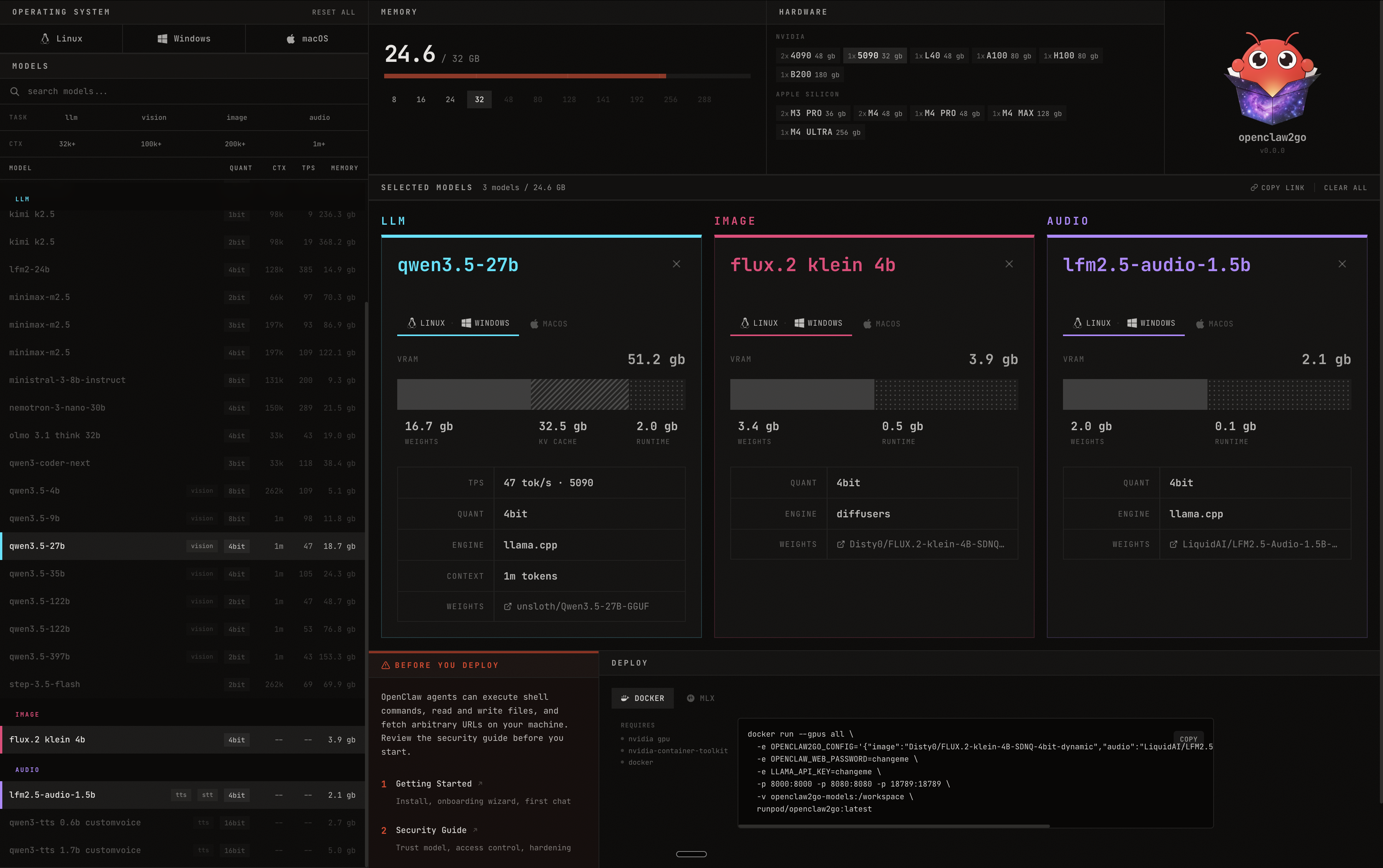
openclaw2go lets you run your OpenClaw agent in a self-contained environment powered by local open source models. Pick your models, see exactly how much VRAM you need, and deploy with a single Docker command.
Features
- Multi-Model Support — Run LLMs, image models, and audio models side by side
- VRAM Calculator — See real-time memory usage across your selected models
- Hardware Detection — Supports NVIDIA GPUs (4090, 5090, L40, A100, H100, B200) and Apple Silicon (M3 Pro, M4, M4 Pro, M4 Max, M4 Ultra)
- One-Click Deploy — Get a Docker run command ready to go, or deploy via MLX
- Cross-Platform — Works on Linux, Windows, and macOS
- Model Browser — Search and filter hundreds of models by task type, quantization, context length, and memory
How It Works
- Select your operating system and available VRAM
- Browse and pick models for each modality (LLM, image, audio)
- Review VRAM usage and hardware compatibility
- Copy the Docker command and deploy
Stack
- llama.cpp for LLM inference
- diffusers for image generation
- Docker for containerized deployment